

Description
AI-Powered Code Review for Azure DevOps
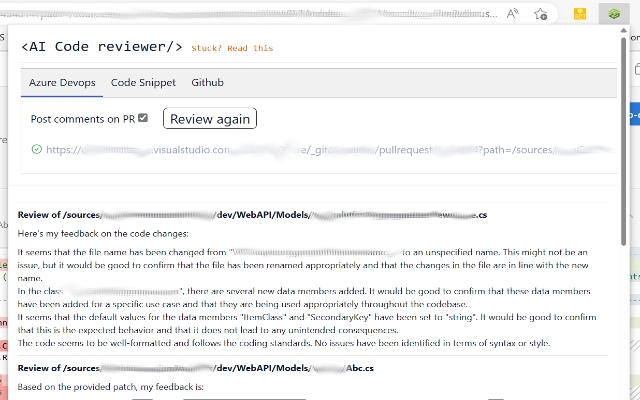
AICodeReviewer is a browser extension designed to streamline code review workflows within Azure DevOps. By integrating with ChatGPT, it enables developers to receive intelligent feedback on pull requests directly in their web browser. This tool helps reduce manual review time, improve code quality, and enhance collaboration across development teams. It is tailored for software engineers, DevOps professionals, and development teams working in agile environments who rely on efficient, accurate code reviews. The extension operates entirely within the browser, offering real-time insights without requiring local installation or complex setup. Use cases include identifying potential bugs, suggesting performance optimizations, and generating clear review comments. The developer did not provide additional system requirements. Performance observations are based on general software behavior patterns.
Key Features & Capabilities
- ChatGPT Integration: Leverages the power of ChatGPT to analyze pull request content and deliver intelligent suggestions for code improvements, including best practices, security considerations, and performance optimizations. This feature helps developers catch issues early and maintain consistent code quality across projects.
- Automated Commenting: Allows users to generate and add contextual comments directly to pull requests, saving time and improving clarity. This is especially useful for repetitive feedback or documentation gaps, enabling faster review cycles.
- Code Snippet Review Interface: Offers a user-friendly interface to highlight and review specific code segments on the pull request page. This enables focused analysis and easier identification of logic flaws, redundant code, or structural issues.
- Cross-Platform Support: Compatible with both Google Chrome and Microsoft Edge, ensuring accessibility for developers using different browsers. This flexibility supports diverse team environments and minimizes tooling friction.
User Interface, Workflow & Performance
The extension features a minimal, non-intrusive interface that integrates seamlessly into the Azure DevOps web UI. Users can activate the tool with a single click, and the interface appears inline with the pull request content, preserving the original workflow. Navigation is intuitive, with clearly labeled buttons and tooltips that guide users through each feature. The workflow is designed to reduce context switching—developers can review code, receive AI feedback, and add comments without leaving the browser tab. Performance is optimized for browser-based execution, with no noticeable lag during standard use. The developer did not specify resource usage details. Stability appears consistent during typical review sessions, with no reported crashes or memory leaks. CPU and RAM behavior are not publicly documented, but the extension operates efficiently within standard browser constraints.Compatibility & System Requirements
AICodeReviewer is compatible with Windows, Mac, and Linux operating systems, making it accessible to a broad range of developers. It supports Google Chrome and Microsoft Edge browsers, ensuring wide deployment across development teams. The extension has a file size of 5.2 MB, which is lightweight and suitable for quick installation. The software version is 1.0.0, released on May 20, 2024. Exact system requirements were not listed. Compatibility information was partially provided. No additional hardware or software dependencies are known to be required beyond a modern browser and an active internet connection.Pros and Cons
Pros
- Integrates AI-driven insights directly into Azure DevOps workflow
- Reduces time spent on repetitive code review tasks
- Supports multiple browsers and operating systems
- Lightweight installation with minimal impact on system resources
- Free to use with no licensing barriers
Cons
- No offline functionality available
- Relies on external AI service (ChatGPT) for core functionality
- Exact performance metrics not publicly disclosed
- Dependent on stable internet connection for full operation
- Advanced customization options not specified
Is AICodeReviewer compatible with my browser?
The extension supports Google Chrome and Microsoft Edge, which are widely used among developers. It is designed to work seamlessly with these browsers on Windows, Mac, and Linux systems.
Can I use this tool without an internet connection?
No, the extension requires an active internet connection to access the ChatGPT service. Offline usage is not supported due to its reliance on cloud-based AI processing.
Is AICodeReviewer safe to use with sensitive code?
The extension processes code content through external AI services. Users should exercise caution when reviewing proprietary or confidential code, as data may be transmitted to third-party servers during analysis.
How often does the extension receive updates?
Updates are released by the AICodeReviewer Team as needed to improve functionality, fix bugs, and maintain compatibility with Azure DevOps. The latest version is 1.0.0, released on May 20, 2024.
What kind of license does AICodeReviewer have?
AICodeReviewer is free to use. No subscription or paid license is required. The developer has not specified a formal open-source license, but the tool is available at no cost.
Final Thoughts
AICodeReviewer brings a powerful AI-assisted approach to code reviews within Azure DevOps, offering developers a practical way to enhance code quality and accelerate review cycles. Its seamless browser integration, lightweight design, and free access make it an attractive tool for development teams aiming to improve collaboration and consistency. While it depends on external AI services and requires internet connectivity, its core functionality delivers tangible benefits for daily workflows. The tool is best suited for software engineers, DevOps professionals, and agile teams who value efficiency and precision in their code review process. For teams seeking to leverage AI without complex setup, AICodeReviewer provides a straightforward, effective solution. Download AICodeReviewer now.Guides & Tutorials for AI Code Reviewer Extension for Chrome
How to install AI Code Reviewer Extension for Chrome
- Click the Preview / Download button above.
- Once redirected, accept the terms and click Install.
- Wait for the AI Code Reviewer Extension for Chrome download to finish on your device.
How to use AI Code Reviewer Extension for Chrome
This software is primarily used for its core features described above. Open the app after installation to explore its capabilities.
User Reviews for AI Code Reviewer Extension for Chrome 0
No reviews found





